Websites and web applications Published on by Thomas Borgognon
What is a CMS ?
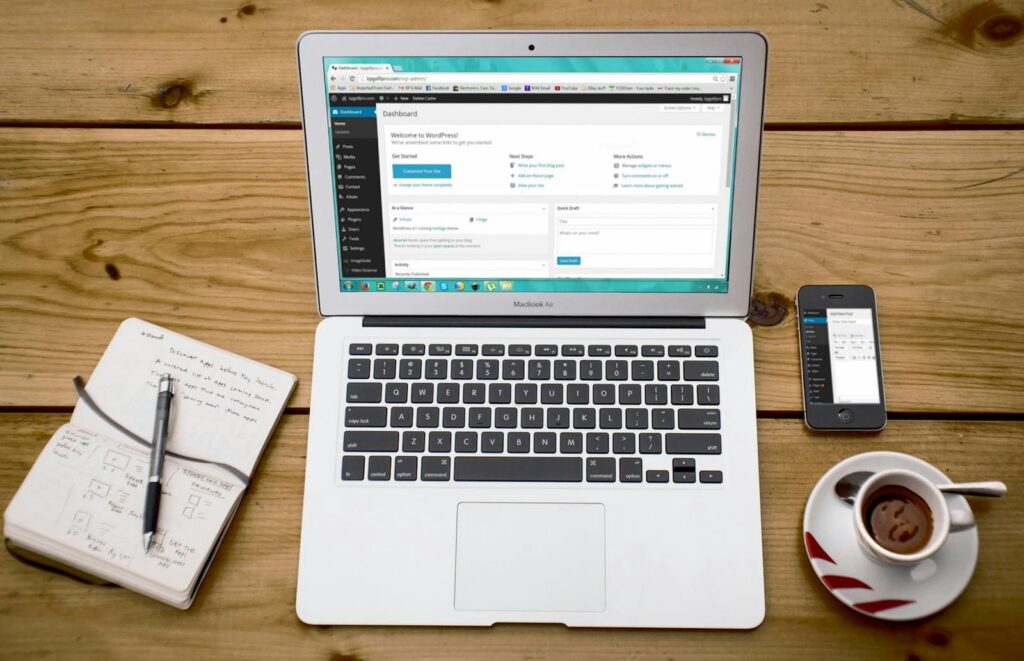
You’ve no doubt come across the term ‘CMS’ when thinking about creating your website, but you might be wondering, ‘What is a CMS?’, ‘What is a CMS used for?’…
That is why I am going to explain what a Content Management System is, and the different types available…
The content at a glance
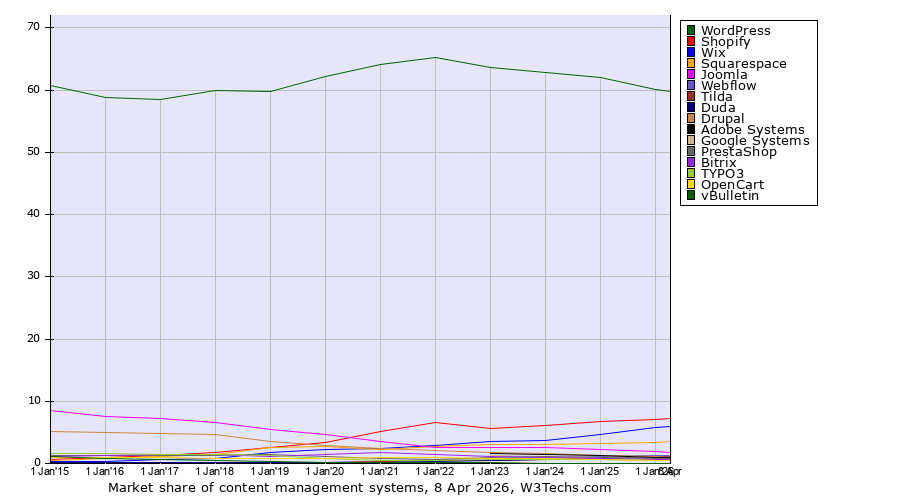
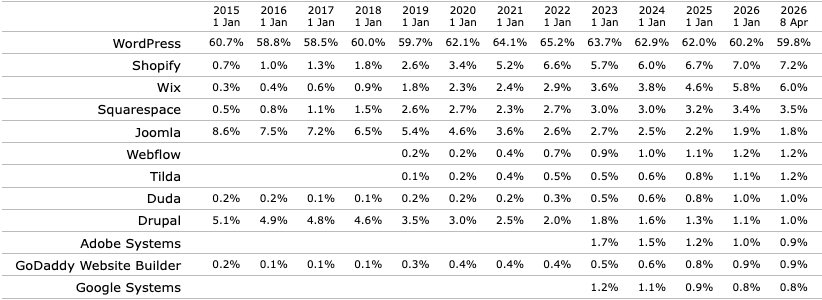
Among the best-known, you’ll recognise names such as WordPress, Shopify and Wix… According to W3Techs, WordPress alone accounted for nearly 60% of the market as of 8 April 2026.
What is a CMS used for?
To begin with, I’ll walk you through the various features of a content management system, breaking it down into four sections: content management, user management, design management and plugins.
Content management
As the name suggests, you’ll be able to manage content!
Stop joking around – what we mean by content management is the very structure of your website. This includes its pages, blog posts, products in your shop, and even settings such as the title, logo and favicon (you know, the little image on the tab or in Google search results).
It is thanks to a CMS that you don’t have to code each blog post individually, but can instead use page templates and, above all, organise your content into a hierarchy: you can, for example, write a post about cooking potatoes in the ‘starchy foods’ sub-category, which is part of the ‘food’ category on your site that brings together everything found in a kitchen (including the collection of tin-plated copper saucepans from the Castellac family’s Regency period, for those in the know).
In short, your CMS allows you to easily format your content, structure it and, above all, organise it.
User management
Showcasing and selling your cookware is all well and good! But what would be even better is managing who does what!
Don’t panic, the CMS is your friend; you keep it with you at all times (another reference for those who spot it… I don’t know what’s got into me with French references today). Let’s say you’re selling those famous saucepans: when a customer places an order on your site, it’s important that they can’t access other customers’ orders. Nor should your intern, who’s in charge of updating your blog, take it upon themselves to offer all your products without supervision.
To do this, you’ll discover the wonderful world of user management. When you want to grant a colleague access to your CMS, you can assign them user rights ranging from read-only access to full permissions allowing them to delete anything (except the CMS itself – only the developer has that power…).
As you can see, without proper management, it’s chaos.
Customising the design
Ladies and gentlemen, we are now moving on to the practical part of the subject, starting with the design.
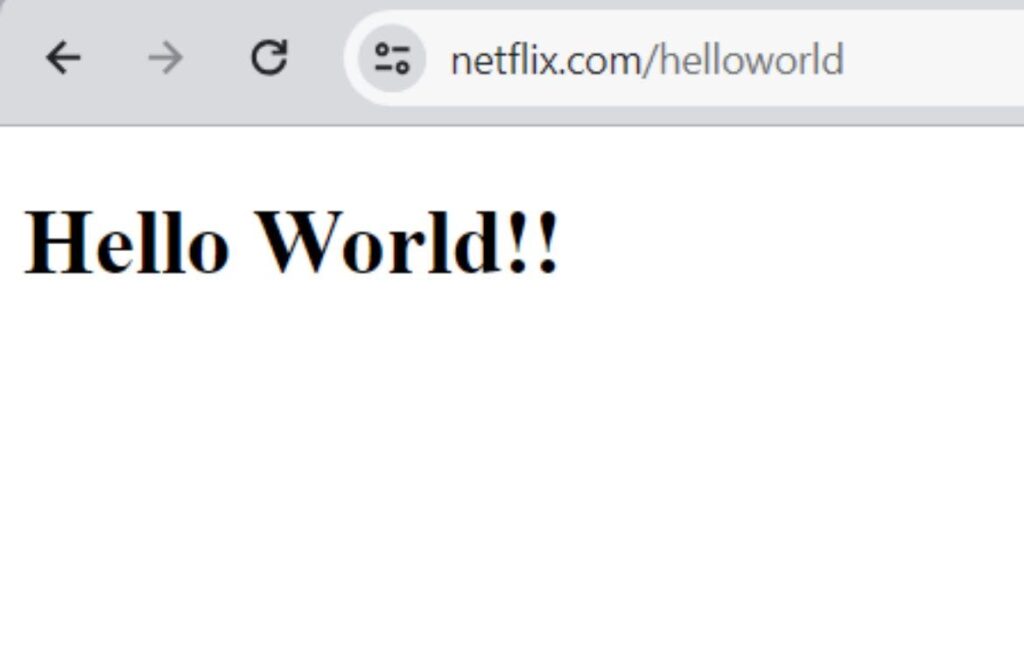
A website without a design looks like Netflix’s ‘Hello World’ page, which is no longer available these days, much to my regret…
There is one element that is central to the design of a CMS: the theme!
Its role is simple: it makes the content that you and your users enter over time look attractive. It ensures that all pages have a consistent look and feel, whilst allowing, for example, the products on your e-commerce site to have their own page styles, just like your blog posts. All this without having to style each page individually. This is what is known as a page template.
This is where the front-end developer comes in. Their job is to take the raw content returned by the backend (in this case, the CMS) and transform it so that the visual output matches the mock-up created by the designer (it reminds me of a Geneva-based development and design agency).
However, if you’re on a tight budget or short on time, you can find templates to download that allow you to tweak certain aspects before you’ve even had time to say, ‘Darling, we’re going off air.’ (More references – it’s mad.)
Plugins
Ahhh, plugins – so wonderful and yet so dangerous.
Let’s take WordPress as an example, which is essentially a blog CMS. Since its inception in 2003, the main purpose of WordPress (which remains the same today) has been to write posts with tags and/or categories to organise content. However, WordPress is now much more than just a blog: it is a true Swiss Army knife, enabling you to blog, create a showcase website, sell online, run a forum… and do it all at the same time.
So you can thank plugins (or ‘plugiciels’, as our friends in Quebec call them) – code extensions designed to expand the basic functionality of your content management system. You’ll find some that are paid, some that are free, and even some that are malicious if you’re not careful.
This brings us to the dangerous side of things. It is important to always be careful about what you install, as these extensions can sometimes contain security flaws and even be a drain on performance.
In short, plugins have brought about a minor revolution on the web, but try not to overdo it, as this could backfire on you.
The different types of CMS
As you will have gathered, CMSs share the same core features, but there are several types of CMS, each with its own specific characteristics. Some are geared towards blogging, others are more geared towards e-commerce, and others are better suited to forums.
Open-source
I’ll start with open-source platforms, which include WordPress, Drupal, Typo3, PrestaShop…
You can recognise them because you have access to the source code, which allows you to modify it and contribute to it.
The advantage is that you’ll have full control over your project, including where you host it. This also allows you to benefit from a free solution that often comes with strong community support.
The downside is that, in most cases, you’ll need some technical know-how to set it up, and you’ll have to manage the hosting yourself.
Proprietaries
To name just a few of the biggest names, this family includes Webflow, Shopify, Wix, Squarespace…
You’ll be able to spot them because you don’t have access to the source code and won’t be able to host your solution wherever you like. However, they do have their advantages too.
As you won’t be responsible for hosting, you’ll be able to make use of platforms with a wealth of resources. This means you’ll have virtually no need for technical knowledge to build your project from scratch.
Let’s move on to the drawbacks: you won’t be able to do exactly what you want; you’ll be limited by the tools and plugins provided. Costs can sometimes become exorbitant if your project grows in scale, not to mention that you’re at the mercy of a single company that holds all the power.
Headless
This category is a bit unusual and technical to grasp. To understand it, you need to realise that the front-end (the visual part of your website) is separate from the back-end (the CMS): technically, you end up with two sites: one where your users will browse and one for managing your content. For those in the know, it isn’t actually necessary to have two sites, but we’d be getting into a topic far too long for this article; however, it could be the subject of a second article.
This category includes solutions such as Strapi, which is open source, Contentful, which is proprietary, and many others, such as WordPress, which could also be included in this category.
As for the benefits, in my opinion you get the best of all: visual freedom. More often than not, when your CMS includes your front-end, you’re restricted by the technical stack. For example, with Drupal, your front-end is rendered using PHP, which significantly limits page transitions and micro-iterations that you could otherwise achieve with a solution like NextJS. You can even link your content to your mobile app using a headless solution.
The downside is that you end up having to develop your own interface and ensure the connection between the visual elements and the content, which means you need specific skills.
In short, what is the best solution?
As with everything, there’s no such thing as a good or bad situation; there are only encounters (I promise, that’s the last one)…
It all depends on your project:
- If you’re planning to build a large-scale mobile app with a website, content and complex logic, you can certainly opt for a headless solution, but we would advise against choosing a proprietary solution.
- Si vous développez un site pour la vente de casseroles, les solutions open source et propriétaires seront bien plus adaptées en termes de budget et de temps.
Here at O’Matic, we favour open-source and headless solutions to give you full control over everything we deliver, from the code right through to hosting.
If you’d like to develop your project but aren’t sure where to start, please feel free to download our specifications template, book an audit or get in touch with us.
Sur ce, je vais aller réviser mes classiques du cinéma.
