UX/UI Published on by Chloé Chassany
Bastien and Scapin’s criteria

J. M. Christian Bastien and Dominique Scapin are two researchers in ergonomic psychology and cognitive ergonomics who have conducted research on user interfaces. In 1993, they published their heuristics, also known as the ‘Bastien and Scapin criteria’, which enable the usability of a website, software or application to be measured using specific criteria.
These criteria enable us to measure the quality of interaction between the user and the interface through 17 criteria divided into 8 categories, which we will present here.
This article is quite long, but it lists all the categories and criteria. We will come back to this later to create a summary sheet!
1. Guidance
Guidance is the first of the eight categories of criteria. It helps the user interact with the interface.
It comprises four criteria:
Incentive
The first criterion, incentive, as its name suggests, encourages the user to perform specific actions and presents different alternatives.
We can list:
- l’indication du format adéquat à saisir dans un champ de texte (ex : jj/mm/aaaa)
- add labels to fill-in fields
- announcing the expected length in a field
Grouping and distinguishing items
This is simply the visual organization of interface elements.
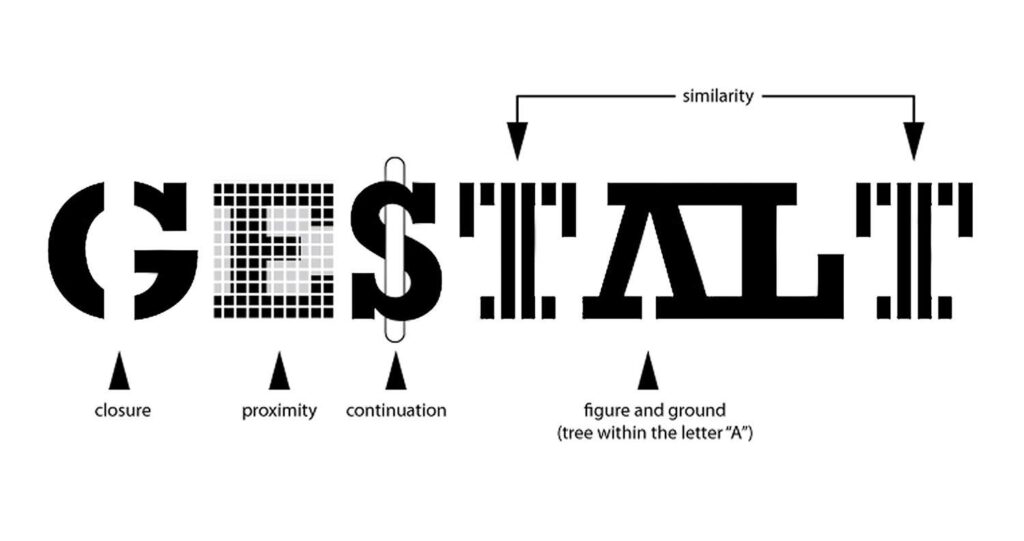
Based, among other things, on Gestalt principles, this criterion can be used to differentiate and/or bring together several visual elements:
- by location: when close together, they seem connected; when apart, they are indifferent to each other
- by format: with the same size, the same color… elements come together
Good organization of elements on an interface provides a more pleasant experience for the user, enabling him to find his way around and memorize elements.
Immediate feedback
This is one of the most important criteria: showing that an action is carried out as quickly as possible:
- Showing real-time field input allows the user to see where they are in the process.
- indicate a bug, a delay to inform the user of the processing of his request
Legibility
Ce critère se rapproche de près de l’accessibilité. Offrir à l’utilisateur une interface réfléchie, non pas uniquement pour être jolie, mais aussi et surtout pour être lisible, est l’une des meilleures manières de ne pas le frustrer et faciliter sa lecture.
Readability includes all lexical characteristics:
- text line length
- title and text case
- text alignment and justification
- hyphenation avoidance
- …
Reading on a screen is not as easy as reading on paper: the typography is different, the distance changes… Making it easier for a user to read by respecting defined criteria therefore creates the best conditions.
2. Workload
The second category of Bastien and Scapin’s criteria! The greater the workload, the greater the number of errors.
By reducing the load a user perceives, by reducing actions and their duration, we also reduce the risk of abandonment.
There are 2 criteria in this category:
Brevity
The faster the activity, the fewer the errors.
In fact, by being concise and reducing the number of actions, the user’s experience is enhanced, as his or her reading and typing work is reduced.
Information density
Information density refers to a user’s perception of a set of elements.
When too many elements are perceived, or when it is asked to remember previous actions or data, users perceive this negatively. It demands too much attention and effort, when the action could be avoided or appear otherwise.
3. Explicit control
It’s all about user control over the interface. The system must react correctly to the user’s actions. This category includes 2 key criteria:
Explicit actions
When a user acts on an interface, his or her action must be carried out when requested, and without a hitch.
User control
Users must be able to control their own actions.
We must therefore give him the opportunity :
- interrupt an ongoing procedure
- cancel an action or allow it to resume a previously cancelled action
- to make it easy for him to go back
- allow the user to control the pace of input rather than depend on the system’s pace
4. Adaptability
Adaptability concerns the system’s ability to react to the user’s actions and preferences. A task can be performed differently depending on the user’s profile and situation.
2 criteria apply:
Flexibility
Flexibility can be translated (with a pinch of salt) as accessibility: the system can offer interface customization and accessibility options to users.
Taking user experience into account
The interface must adapt to the user’s level and not exclude certain types:
- Experienced users can skip certain steps, notably by using keyboard shortcuts.
- Novice users need more support, and shouldn’t be held back by a lack of understanding.
5. Error handling
How do you get around mistakes? That’s the question this category answers through 3 criteria.
Error protection
The interface must prevent and detect errors. By implementing an analysis during data entry rather than at validation, users are informed at the right moment.
In this way, you can :
- tell users when their session has ended and offer them the option of continuing their session.
- include the words “mandatory” or an asterisk * in labels to indicate when a field is required
- …
Quality of error messages
Error messages are very important. Apart from the traditional 404 error indicating that a page cannot be found, few people know the meaning of error codes. That is why messages must be short, in the right place, accurate and easy to understand.
Error correction
The system must allow interface users to correct their errors, both during and after input:
- Indicate live progress in a maximum number of characters, allowing the user to see where he stands
- Showing the expected data format enables (see Guidance > Incentives) correct data completion.
6. Consistency and coherence
A basic Bastien and Scapin criterion, the aim here is to respect the same style, the same codes and the same locations throughout the interface, in order to preserve consistency and coherence.
Today, we also talk about design systems that enable us to establish the components to be used across the screens of an interface (colours, fonts, buttons, text fields, etc.).
7. Meaning of codes and names
Every action has a code. Copy and paste is done with Ctrl-C/Ctrl-V. If this shortcut were to change, many users would be at a loss.
On an interface, it’s the same thing:
- icons have a code that most people know:
- gears or tools for adjustments
- a stylized character for the customer area
- an arrow coming out of a rectangle to disconnect
- colors have a code:
- red for an error
- green for information, correct entry
8. Compatibility
The last of Bastien and Scapin’s criteria refers to the relationship between several elements:
- user characteristics (age, perception, expectations, skills, etc.), constraints (situation, disabilities, etc.) and tasks performed.
- compatibility between user actions and system results.
- consistency between the different stages of a process.
In a nutshell
Bastien and Scapin’s heuristics or Critères de Bastien et Scapin (Bastien and Scapin’s Criteria) have become benchmarks in ergonomics, as they enable us to evaluate an interface without necessarily calling for user testing. From an initial analysis, they can highlight usability problems and correct them as quickly as possible, right from the design stage, to create interfaces that are pleasant, interesting and easy to use.
